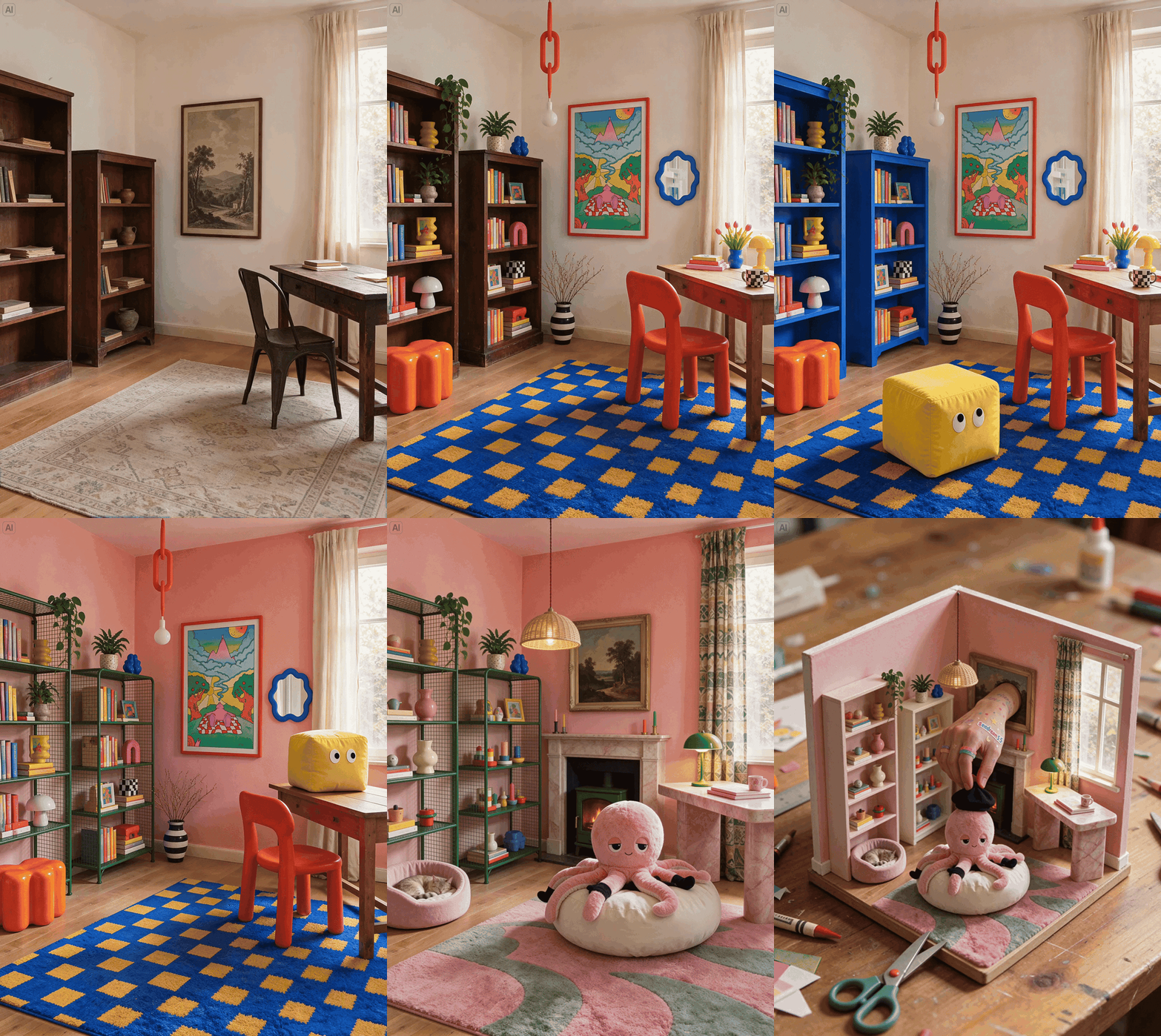
Generate and edit images with Seedream 5.5 Pro, including transparent RGBA assets and consistent multi-turn edits.
Use Seedream 5.5 Pro through AnyFast for text-to-image generation, reference-image editing, and transparent image output. The request model ID is seedream-5-5-pro. ByteDance’s Seedream 5.5 announcement describes the series’ multi-turn editing, native RGBA, realism, and text-rendering capabilities.
To request transparent output, set background to transparent and output_format to png. A request without background: "transparent" returns an opaque image.
curl https://www.anyfast.ai/v1/images/generations \
  -H "Authorization: Bearer YOUR_API_KEY" \
  -H "Content-Type: application/json" \
  -d '{
    "model": "seedream-5-5-pro",
    "prompt": "A lifelike editorial photograph of a ceramic teapot on a wooden table, soft morning window light, fine glaze and wood textures",
    "size": "1K",
    "response_format": "url",
    "output_format": "png",
    "watermark": false
  }'
import requestsresponse = requests.post( "https://www.anyfast.ai/v1/images/generations", headers={ "Authorization": "Bearer YOUR_API_KEY", "Content-Type": "application/json", }, json={ "model": "seedream-5-5-pro", "prompt": "A lifelike editorial photograph of a ceramic teapot on a wooden table, soft morning window light, fine glaze and wood textures", "size": "1K", "response_format": "url", "output_format": "png", "watermark": False, },)print(response.json())
The Seedream 5.5 series is designed to render lighting, materials, and skin textures naturally and to improve text rendering. Describe the intended composition, materials, lighting, and any exact text in the prompt.
curl https://www.anyfast.ai/v1/images/generations \
  -H "Authorization: Bearer YOUR_API_KEY" \
  -H "Content-Type: application/json" \
  -d '{
    "model": "seedream-5-5-pro",
    "prompt": "Change the blue scarf to forest green. Preserve the subject, pose, background, lighting, and all other details.",
    "image": "https://example.com/source-image.png",
    "size": "1K",
    "response_format": "url",
    "output_format": "png",
    "watermark": false
  }'
For multi-turn editing, pass the latest generated image as image in the next request. State which region or element to change and which details to preserve. ByteDance describes pixel-level preservation of unchanged regions across successive Seedream 5.5 edits.
Official Seedream 5.5 multi-turn editing example (announcement model). Source: ByteDance Seed.
The size options 1K, 1.5K, and 2K were accepted. Their returned dimensions were 1248x832, 1888x1248, and 2512x1680, respectively. The response includes the actual dimensions in data[].size. For image editing, pass a source image URL in image.See the official Seedream 5.5 overview and Seedream 5.5 announcement for model capabilities.
API Reference
View all Seedream 5.5 Pro workflows.
Was this page helpful?
{"docsConfig":{"theme":"mint","$schema":"https://mintlify.com/docs.json","name":"AnyFast","description":"AnyFast API documentation — unified access to AI models from Anthropic, ByteDance, OpenAI, and more.","colors":{"primary":"#6D28D9","light":"#8B5CF6","dark":"#5B21B6"},"logo":{"light":"https://mintcdn.com/13108701256/jzu-_XFYEJnqgdJi/logo/light.svg?fit=max\u0026auto=format\u0026n=jzu-_XFYEJnqgdJi\u0026q=85\u0026s=dd4b307fc5a359cdfeed37fcd3015842","dark":"https://mintcdn.com/13108701256/jzu-_XFYEJnqgdJi/logo/dark.svg?fit=max\u0026auto=format\u0026n=jzu-_XFYEJnqgdJi\u0026q=85\u0026s=3303bc5b49fec3aa2015dc9927286584","href":"https://www.anyfast.ai"},"favicon":"https://mintcdn.com/13108701256/ciuuPfOYrnV5Potx/favicon.svg?fit=max\u0026auto=format\u0026n=ciuuPfOYrnV5Potx\u0026q=85\u0026s=bb57081a959cb46f2fd60906102179ce","navbar":{"links":[],"primary":{"type":"button","label":"Dashboard","href":"https://www.anyfast.ai/console/token"}},"footer":{"socials":{}},"search":{"prompt":"Search docs, APIs, models..."},"seo":{"metatags":{"og:image":"https://docs.anyfast.ai/images/layfz/social-media-cover.jpg","og:site_name":"AnyFast Docs","twitter:card":"summary_large_image","twitter:site":"@anyfast_ai","twitter:image":"https://docs.anyfast.ai/images/layfz/social-media-cover.jpg"}},"integrations":{"ga4":{"measurementId":"G-LE1QQD03ZG"}},"contextual":{"options":["copy","view","chatgpt","claude","perplexity","mcp","cursor","vscode"],"display":"header"},"metadata":{"timestamp":false},"styling":{"latex":false},"navigation":{"global":{"anchors":[{"anchor":"Documentation","icon":"book-open-cover","href":"https://docs.anyfast.ai"}]},"languages":[{"language":"en","default":true,"href":""},{"language":"zh","href":"zh"}]}},"deployment":{"deploymentMetadataValue":{"subdomain":"13108701256","hasAudioNarration":false,"actualSubdomain":"13108701256","customDomains":["docs.anyfast.ai"],"gitSource":{"type":"gitlab","owner":"maas","repo":"docs-anyfast","hostUrl":"https://gitlab.anyfast.com.cn","projectId":39,"deployBranch":"main","contentDirectory":"","isPrivate":true,"mountPath":"","label":""},"feedback":{"thumbs":true},"entitlements":{"AI_CHAT":{"status":"DISABLED"}},"buildId":"6af4229d32d919033b1536cb","clientVersion":"0.0.4102","searchFilterCounts":[{"language":"en","tag":"Model Introduction","count":390},{"language":"zh","tag":"模型介绍","count":390},{"language":"en","tag":"API Reference","count":205},{"language":"zh","tag":"API 参考","count":205},{"language":"en","tag":"Model APIs","count":198},{"language":"zh","tag":"模型 API","count":198},{"language":"en","tag":"OpenAI","count":78},{"language":"zh","tag":"OpenAI","count":78},{"language":"en","tag":"Alibaba","count":64},{"language":"zh","tag":"Alibaba","count":64},{"language":"en","tag":"ByteDance","count":56},{"language":"en","tag":"Google","count":56},{"language":"zh","tag":"ByteDance","count":56},{"language":"zh","tag":"Google","count":56},{"language":"en","tag":"Anthropic","count":51},{"language":"zh","tag":"Anthropic","count":51},{"language":"en","tag":"Text \u0026 multimodal","count":42},{"language":"zh","tag":"文本与多模态","count":42},{"language":"en","tag":"Use Cases","count":38},{"language":"zh","tag":"场景示例","count":38}]},"assistantConfig":{"enableAskAiButton":false,"enableStarterQuestions":false,"enableContextualStarterQuestions":false,"enableAskAiSearchBar":true},"basePath":"","hasChatPermissions":false,"hasWebMcpPermissions":false,"toggles":[{"name":"kill-isr","enabled":true,"variant":{"name":"disabled","enabled":false,"feature_enabled":true},"impressionData":false},{"name":"custom-rbac-roles","enabled":true,"variant":{"name":"disabled","enabled":false,"feature_enabled":true},"impressionData":false},{"name":"agent-mintlify-slack","enabled":true,"variant":{"name":"disabled","enabled":false,"feature_enabled":true},"impressionData":false},{"name":"agent-integrations-settings","enabled":true,"variant":{"name":"disabled","enabled":false,"feature_enabled":true},"impressionData":false},{"name":"rbac-expansion","enabled":true,"variant":{"name":"disabled","enabled":false,"feature_enabled":true},"impressionData":false},{"name":"automations-pr-grouping","enabled":true,"variant":{"name":"disabled","enabled":false,"feature_enabled":true},"impressionData":false},{"name":"custom-prefix","enabled":true,"variant":{"name":"disabled","enabled":false,"feature_enabled":true},"impressionData":false},{"name":"analytics-v7","enabled":true,"variant":{"name":"disabled","enabled":false,"feature_enabled":true},"impressionData":false},{"name":"user-flows-analytics","enabled":true,"variant":{"name":"disabled","enabled":false,"feature_enabled":true},"impressionData":false},{"name":"no-publish-flow","enabled":true,"variant":{"name":"disabled","enabled":false,"feature_enabled":true},"impressionData":false},{"name":"workos-onboarding","enabled":true,"variant":{"name":"disabled","enabled":false,"feature_enabled":true},"impressionData":false},{"name":"llms-txt-v2","enabled":true,"variant":{"name":"disabled","enabled":false,"feature_enabled":true},"impressionData":false},{"name":"snapshot-serving-live","enabled":true,"variant":{"name":"disabled","enabled":false,"feature_enabled":true},"impressionData":false},{"name":"stripTemperatureMiddleware","enabled":true,"variant":{"name":"disabled","enabled":false,"feature_enabled":true},"impressionData":false},{"name":"support-platform-pylon-zendesk","enabled":true,"variant":{"name":"disabled","enabled":false,"feature_enabled":true},"impressionData":false},{"name":"snapshot-serving","enabled":true,"variant":{"name":"disabled","enabled":false,"feature_enabled":true},"impressionData":false},{"name":"instant-rollback","enabled":true,"variant":{"name":"disabled","enabled":false,"feature_enabled":true},"impressionData":false},{"name":"granular-notifications-server","enabled":true,"variant":{"name":"disabled","enabled":false,"feature_enabled":true},"impressionData":false},{"name":"granular-notifications","enabled":true,"variant":{"name":"disabled","enabled":false,"feature_enabled":true},"impressionData":false},{"name":"automations-fable","enabled":true,"variant":{"name":"disabled","enabled":false,"feature_enabled":true},"impressionData":false},{"name":"fixed-ai-action-pricing","enabled":true,"variant":{"name":"disabled","enabled":false,"feature_enabled":true},"impressionData":false},{"name":"automation-resolve-merge-conflict","enabled":true,"variant":{"name":"disabled","enabled":false,"feature_enabled":true},"impressionData":false},{"name":"scoped-publishing","enabled":true,"variant":{"name":"disabled","enabled":false,"feature_enabled":true},"impressionData":false},{"name":"mintql","enabled":true,"variant":{"name":"disabled","enabled":false,"feature_enabled":true},"impressionData":false},{"name":"page-level-analytics","enabled":true,"variant":{"name":"disabled","enabled":false,"feature_enabled":true},"impressionData":false},{"name":"editor-version-history-v2","enabled":true,"variant":{"name":"disabled","enabled":false,"feature_enabled":true},"impressionData":false},{"name":"billing-page-v2","enabled":true,"variant":{"name":"disabled","enabled":false,"feature_enabled":true},"impressionData":false},{"name":"full-page-search","enabled":true,"variant":{"name":"disabled","enabled":false,"feature_enabled":true},"impressionData":false},{"name":"workspace-projects","enabled":true,"variant":{"name":"disabled","enabled":false,"feature_enabled":true},"impressionData":false},{"name":"assistant-v5","enabled":true,"variant":{"name":"disabled","enabled":false,"feature_enabled":true},"impressionData":false},{"name":"fork-pr-previews","enabled":true,"variant":{"name":"disabled","enabled":false,"feature_enabled":true},"impressionData":false},{"name":"revalidation-jwt","enabled":true,"variant":{"name":"disabled","enabled":false,"feature_enabled":true},"impressionData":false},{"name":"workos-sso-scim","enabled":true,"variant":{"name":"disabled","enabled":false,"feature_enabled":true},"impressionData":false},{"name":"hobby-abuse-scan","enabled":true,"variant":{"name":"disabled","enabled":false,"feature_enabled":true},"impressionData":false},{"name":"dashboard-inbox","enabled":true,"variant":{"name":"disabled","enabled":false,"feature_enabled":true},"impressionData":false},{"name":"workos-signup","enabled":true,"variant":{"name":"disabled","enabled":false,"feature_enabled":true},"impressionData":false},{"name":"turbopuffer-dual-write","enabled":true,"variant":{"name":"disabled","enabled":false,"feature_enabled":true},"impressionData":false},{"name":"workos-enabled","enabled":true,"variant":{"name":"disabled","enabled":false,"feature_enabled":true},"impressionData":false},{"name":"approve-review-flow","enabled":true,"variant":{"name":"disabled","enabled":false,"feature_enabled":true},"impressionData":false},{"name":"editor-metadata","enabled":true,"variant":{"name":"disabled","enabled":false,"feature_enabled":true},"impressionData":false},{"name":"sso-setup-deadline-banner","enabled":true,"variant":{"name":"disabled","enabled":false,"feature_enabled":true},"impressionData":false},{"name":"turbopuffer-serve","enabled":true,"variant":{"name":"disabled","enabled":false,"feature_enabled":true},"impressionData":false},{"name":"live-agents","enabled":true,"variant":{"name":"disabled","enabled":false,"feature_enabled":true},"impressionData":false}],"googleFontsInlined":false},"customCss":[{"filePath":"global.css","content":":root{font-size:17px;zoom:80%}.bg-primary\\/10{background-color:transparent!important}.dark .dark\\:bg-primary-light\\/10{background-color:transparent!important}.contact-purple-info svg{color:#6D28D9!important;stroke:#6D28D9!important}.contact-enterprise-card svg{color:#6D28D9!important;stroke:#6D28D9!important}.contact-best-ways-card-inner{border:1px solid rgba(128, 128, 128, 0.2);border-radius:1rem;padding:1.5rem;height:auto;box-sizing:border-box}.contact-best-ways-card-inner p.contact-best-ways-heading{display:flex;align-items:center;gap:0.5rem;margin:0 0 0.75rem!important;font-weight:600;line-height:1.4}.contact-best-ways-card-inner p{margin:0!important;line-height:1.6}.contact-best-ways-check{display:inline-flex;width:1.125rem;height:1.125rem;flex:0 0 1.125rem;align-items:center;justify-content:center;border-radius:50%;background-color:#6D28D9;color:#fff;font-size:0.75rem;font-weight:700;line-height:1}#search-bar-entry{border:1px solid rgba(140, 130, 160, 0.25)!important;border-radius:6px!important}#search-bar-entry:hover{border:1.5px solid #6D28D9!important;box-shadow:0 0 0 3px rgba(109, 40, 217, 0.16)!important}#navbar a[href*=\"/console/token\"]{border-radius:6px!important}#topbar-cta-button a[href*=\"/console/token\"]>span.absolute{border-radius:6px!important}#sidebar .method-nav-pill{display:none!important}#sidebar a[href*=\"/api-reference/model-api/\"]>div:has(>.method-nav-pill){display:none!important}@media (min-width: 1024px){#sidebar{height:calc(125dvh - var(--mintlify-slot-header-height, calc(4rem + var(--topbar-tabs-height, 0rem))) - var(--banner-height, 0px))!important}}.kling-api-example-panel{float:right;position:relative;top:auto;width:47%;margin:1.5rem 0 1.5rem 2rem;z-index:1}.kling-api-example-panel>div{margin-top:0;margin-bottom:1rem}.kling-api-example-panel.api-full-width-example-panel{float:none;position:static;width:100%;margin:1rem 0 1.5rem;clear:both}.happyhorse-api-example-panel,.seedream-api-example-panel,.wan-api-example-panel{display:block;position:relative;top:auto;width:60%;margin-top:1.5rem;margin-bottom:1.5rem;margin-left:1.25rem;clear:right}.seedream-api-example-panel+.seedream-api-example-panel{margin-top:2.5rem}.happyhorse-api-example-panel pre,.seedream-api-example-panel pre,.wan-api-example-panel pre{overflow-x:auto;overflow-y:hidden;overflow-wrap:normal;white-space:pre!important;word-break:normal}.happyhorse-api-example-panel .whitespace-pre,.seedream-api-example-panel .whitespace-pre,.wan-api-example-panel .whitespace-pre{overflow-wrap:normal;white-space:pre!important;word-break:normal}.happyhorse-api-example-panel pre code,.seedream-api-example-panel pre code,.wan-api-example-panel pre code{max-width:none!important;min-width:max-content!important;width:max-content!important}@media (min-width: 1280px){#navbar .max-w-8xl.mx-auto.relative{width:100%!important;max-width:none!important;margin-left:0!important;margin-right:0!important}div:has(>main#content-container){width:100%!important;max-width:none!important;margin-left:0!important;margin-right:0!important;padding-left:2rem!important;padding-right:1.5rem!important}#sidebar{width:16rem!important;min-width:16rem!important;max-width:16rem!important}#content{width:100%!important}#content-side-layout{width:9rem!important;min-width:9rem!important;max-width:9rem!important;transform:none}#content-side-layout:has(.code-group){width:28rem!important;min-width:28rem!important;max-width:28rem!important}#table-of-contents-layout{width:9rem!important;min-width:9rem!important;max-width:9rem!important;padding-left:0!important;transform:none}#table-of-contents{width:9rem!important}.kling-api-example-panel{width:51%;margin-left:2rem}}@media (max-width: 1400px){.happyhorse-api-example-panel,.seedream-api-example-panel,.wan-api-example-panel{float:none;position:static;width:100%;margin:1rem 0 1.5rem}}@media (max-width: 1024px){.kling-api-example-panel{float:none;position:static;width:100%;margin:1rem 0 1.5rem}.happyhorse-api-example-panel,.seedream-api-example-panel,.wan-api-example-panel{width:100%}}"}],"page":{"pagePath":"guides/model-api/bytedance/seedream-5-5","slug":"/guides/model-api/bytedance/seedream-5-5","pageMetadata":{"title":"Seedream 5.5 Pro","description":"Generate and edit images with Seedream 5.5 Pro, including transparent RGBA assets and consistent multi-turn edits.","href":"/guides/model-api/bytedance/seedream-5-5"},"description":{"compiledSource":"\"use strict\";\nconst {jsx: _jsx} = arguments[0];\nconst {useMDXComponents: _provideComponents} = arguments[0];\nfunction _createMdxContent(props) {\n const _components = {\n p: \"p\",\n ..._provideComponents(),\n ...props.components\n };\n return _jsx(_components.p, {\n children: \"Generate and edit images with Seedream 5.5 Pro, including transparent RGBA assets and consistent multi-turn edits.\"\n });\n}\nfunction MDXContent(props = {}) {\n const {wrapper: MDXLayout} = {\n ..._provideComponents(),\n ...props.components\n };\n return MDXLayout ? _jsx(MDXLayout, {\n ...props,\n children: _jsx(_createMdxContent, {\n ...props\n })\n }) : _createMdxContent(props);\n}\nreturn {\n default: MDXContent\n};\n","frontmatter":{},"scope":{}},"pageType":"default","mdx":{"mdxSource":{"compiledSource":"\"use strict\";const{Fragment:_Fragment,jsx:_jsx,jsxs:_jsxs}=arguments[0];const{useMDXComponents:_provideComponents}=arguments[0];function _createMdxContent(props){const _components={a:`a`,code:`code`,li:`li`,p:`p`,pre:`pre`,span:`span`,strong:`strong`,tbody:`tbody`,td:`td`,th:`th`,thead:`thead`,tr:`tr`,ul:`ul`,..._provideComponents(),...props.components},{Card,CodeBlock,CodeGroup,Frame,Heading,OptimizedImage,Tab,Table,Tabs,Warning}=_components;if(!Card)_missingMdxReference(`Card`,true);if(!CodeBlock)_missingMdxReference(`CodeBlock`,true);if(!CodeGroup)_missingMdxReference(`CodeGroup`,true);if(!Frame)_missingMdxReference(`Frame`,true);if(!Heading)_missingMdxReference(`Heading`,true);if(!OptimizedImage)_missingMdxReference(`OptimizedImage`,true);if(!Tab)_missingMdxReference(`Tab`,true);if(!Table)_missingMdxReference(`Table`,true);if(!Tabs)_missingMdxReference(`Tabs`,true);if(!Warning)_missingMdxReference(`Warning`,true);return _jsxs(_Fragment,{children:[_jsxs(_components.p,{children:[`Use Seedream 5.5 Pro through AnyFast for text-to-image generation, reference-image editing, and transparent image output. The request model ID is `,_jsx(_components.code,{children:`seedream-5-5-pro`}),`. ByteDance’s Seedream 5.5 announcement describes the series’ multi-turn editing, native RGBA, realism, and text-rendering capabilities.`]}),`\n`,_jsxs(Warning,{children:[`To request transparent output, set `,_jsx(_components.code,{children:`background`}),` to `,_jsx(_components.code,{children:`transparent`}),` and `,_jsx(_components.code,{children:`output_format`}),` to `,_jsx(_components.code,{children:`png`}),`. A request without `,_jsx(_components.code,{children:`background: \"transparent\"`}),` returns an opaque image.`]}),`\n`,_jsx(Heading,{level:`2`,id:`key-capabilities`,children:`Key capabilities`}),`\n`,_jsxs(_components.ul,{children:[`\n`,_jsxs(_components.li,{children:[_jsx(_components.strong,{children:`Text to image`}),` — Create images from natural-language prompts with realistic textures and clear rendered text`]}),`\n`,_jsxs(_components.li,{children:[_jsx(_components.strong,{children:`Image editing`}),` — Refine a reference image over multiple turns while preserving regions outside the requested edit`]}),`\n`,_jsxs(_components.li,{children:[_jsx(_components.strong,{children:`Transparent background`}),` — Generate images with full or partial transparency in native RGBA output`]}),`\n`]}),`\n`,_jsxs(Tabs,{children:[_jsxs(Tab,{title:`Text to image`,id:`text-to-image`,\"data-child-heading-ids\":`[\"generate-from-text\"]`,children:[_jsx(Heading,{level:`2`,id:`generate-from-text`,children:`Generate from text`}),_jsxs(CodeGroup,{children:[_jsx(CodeBlock,{filename:`cURL`,numberOfLines:`11`,language:`shellscript`,children:_jsx(_components.pre,{className:`shiki shiki-themes github-light-default dark-plus`,style:{backgroundColor:`#ffffff`,\"--shiki-dark-bg\":`#0B0C0E`,color:`#1f2328`,\"--shiki-dark\":`#D4D4D4`},language:`shellscript`,children:_jsxs(_components.code,{language:`shellscript`,numberOfLines:`11`,children:[_jsxs(_components.span,{className:`line`,children:[_jsx(_components.span,{style:{color:`#953800`,\"--shiki-dark\":`#DCDCAA`},children:`curl`}),_jsx(_components.span,{style:{color:`#0A3069`,\"--shiki-dark\":`#CE9178`},children:` https://www.anyfast.ai/v1/images/generations`}),_jsx(_components.span,{style:{color:`#CF222E`,\"--shiki-dark\":`#D7BA7D`},children:` \\\\`})]}),`\n`,_jsxs(_components.span,{className:`line`,children:[_jsx(_components.span,{style:{color:`#0550AE`,\"--shiki-dark\":`#569CD6`},children:` -H`}),_jsx(_components.span,{style:{color:`#0A3069`,\"--shiki-dark\":`#CE9178`},children:` \"Authorization: Bearer YOUR_API_KEY\"`}),_jsx(_components.span,{style:{color:`#CF222E`,\"--shiki-dark\":`#D7BA7D`},children:` \\\\`})]}),`\n`,_jsxs(_components.span,{className:`line`,children:[_jsx(_components.span,{style:{color:`#0550AE`,\"--shiki-dark\":`#569CD6`},children:` -H`}),_jsx(_components.span,{style:{color:`#0A3069`,\"--shiki-dark\":`#CE9178`},children:` \"Content-Type: application/json\"`}),_jsx(_components.span,{style:{color:`#CF222E`,\"--shiki-dark\":`#D7BA7D`},children:` \\\\`})]}),`\n`,_jsxs(_components.span,{className:`line`,children:[_jsx(_components.span,{style:{color:`#0550AE`,\"--shiki-dark\":`#569CD6`},children:` -d`}),_jsx(_components.span,{style:{color:`#0A3069`,\"--shiki-dark\":`#CE9178`},children:` '{`})]}),`\n`,_jsx(_components.span,{className:`line`,children:_jsx(_components.span,{style:{color:`#0A3069`,\"--shiki-dark\":`#CE9178`},children:` \"model\": \"seedream-5-5-pro\",`})}),`\n`,_jsx(_components.span,{className:`line`,children:_jsx(_components.span,{style:{color:`#0A3069`,\"--shiki-dark\":`#CE9178`},children:` \"prompt\": \"A lifelike editorial photograph of a ceramic teapot on a wooden table, soft morning window light, fine glaze and wood textures\",`})}),`\n`,_jsx(_components.span,{className:`line`,children:_jsx(_components.span,{style:{color:`#0A3069`,\"--shiki-dark\":`#CE9178`},children:` \"size\": \"1K\",`})}),`\n`,_jsx(_components.span,{className:`line`,children:_jsx(_components.span,{style:{color:`#0A3069`,\"--shiki-dark\":`#CE9178`},children:` \"response_format\": \"url\",`})}),`\n`,_jsx(_components.span,{className:`line`,children:_jsx(_components.span,{style:{color:`#0A3069`,\"--shiki-dark\":`#CE9178`},children:` \"output_format\": \"png\",`})}),`\n`,_jsx(_components.span,{className:`line`,children:_jsx(_components.span,{style:{color:`#0A3069`,\"--shiki-dark\":`#CE9178`},children:` \"watermark\": false`})}),`\n`,_jsx(_components.span,{className:`line`,children:_jsx(_components.span,{style:{color:`#0A3069`,\"--shiki-dark\":`#CE9178`},children:` }'`})}),`\n`]})})}),_jsx(CodeBlock,{filename:`Python`,numberOfLines:`19`,language:`python`,children:_jsx(_components.pre,{className:`shiki shiki-themes github-light-default dark-plus`,style:{backgroundColor:`#ffffff`,\"--shiki-dark-bg\":`#0B0C0E`,color:`#1f2328`,\"--shiki-dark\":`#D4D4D4`},language:`python`,children:_jsxs(_components.code,{language:`python`,numberOfLines:`19`,children:[_jsxs(_components.span,{className:`line`,children:[_jsx(_components.span,{style:{color:`#CF222E`,\"--shiki-dark\":`#C586C0`},children:`import`}),_jsx(_components.span,{style:{color:`#1F2328`,\"--shiki-dark\":`#D4D4D4`},children:` requests`})]}),`\n`,_jsx(_components.span,{className:`line`}),`\n`,_jsxs(_components.span,{className:`line`,children:[_jsx(_components.span,{style:{color:`#1F2328`,\"--shiki-dark\":`#D4D4D4`},children:`response `}),_jsx(_components.span,{style:{color:`#CF222E`,\"--shiki-dark\":`#D4D4D4`},children:`=`}),_jsx(_components.span,{style:{color:`#1F2328`,\"--shiki-dark\":`#D4D4D4`},children:` requests.post(`})]}),`\n`,_jsxs(_components.span,{className:`line`,children:[_jsx(_components.span,{style:{color:`#0A3069`,\"--shiki-dark\":`#CE9178`},children:` \"https://www.anyfast.ai/v1/images/generations\"`}),_jsx(_components.span,{style:{color:`#1F2328`,\"--shiki-dark\":`#D4D4D4`},children:`,`})]}),`\n`,_jsxs(_components.span,{className:`line`,children:[_jsx(_components.span,{style:{color:`#953800`,\"--shiki-dark\":`#9CDCFE`},children:` headers`}),_jsx(_components.span,{style:{color:`#CF222E`,\"--shiki-dark\":`#D4D4D4`},children:`=`}),_jsx(_components.span,{style:{color:`#1F2328`,\"--shiki-dark\":`#D4D4D4`},children:`{`})]}),`\n`,_jsxs(_components.span,{className:`line`,children:[_jsx(_components.span,{style:{color:`#0A3069`,\"--shiki-dark\":`#CE9178`},children:` \"Authorization\"`}),_jsx(_components.span,{style:{color:`#1F2328`,\"--shiki-dark\":`#D4D4D4`},children:`: `}),_jsx(_components.span,{style:{color:`#0A3069`,\"--shiki-dark\":`#CE9178`},children:`\"Bearer YOUR_API_KEY\"`}),_jsx(_components.span,{style:{color:`#1F2328`,\"--shiki-dark\":`#D4D4D4`},children:`,`})]}),`\n`,_jsxs(_components.span,{className:`line`,children:[_jsx(_components.span,{style:{color:`#0A3069`,\"--shiki-dark\":`#CE9178`},children:` \"Content-Type\"`}),_jsx(_components.span,{style:{color:`#1F2328`,\"--shiki-dark\":`#D4D4D4`},children:`: `}),_jsx(_components.span,{style:{color:`#0A3069`,\"--shiki-dark\":`#CE9178`},children:`\"application/json\"`}),_jsx(_components.span,{style:{color:`#1F2328`,\"--shiki-dark\":`#D4D4D4`},children:`,`})]}),`\n`,_jsx(_components.span,{className:`line`,children:_jsx(_components.span,{style:{color:`#1F2328`,\"--shiki-dark\":`#D4D4D4`},children:` },`})}),`\n`,_jsxs(_components.span,{className:`line`,children:[_jsx(_components.span,{style:{color:`#953800`,\"--shiki-dark\":`#9CDCFE`},children:` json`}),_jsx(_components.span,{style:{color:`#CF222E`,\"--shiki-dark\":`#D4D4D4`},children:`=`}),_jsx(_components.span,{style:{color:`#1F2328`,\"--shiki-dark\":`#D4D4D4`},children:`{`})]}),`\n`,_jsxs(_components.span,{className:`line`,children:[_jsx(_components.span,{style:{color:`#0A3069`,\"--shiki-dark\":`#CE9178`},children:` \"model\"`}),_jsx(_components.span,{style:{color:`#1F2328`,\"--shiki-dark\":`#D4D4D4`},children:`: `}),_jsx(_components.span,{style:{color:`#0A3069`,\"--shiki-dark\":`#CE9178`},children:`\"seedream-5-5-pro\"`}),_jsx(_components.span,{style:{color:`#1F2328`,\"--shiki-dark\":`#D4D4D4`},children:`,`})]}),`\n`,_jsxs(_components.span,{className:`line`,children:[_jsx(_components.span,{style:{color:`#0A3069`,\"--shiki-dark\":`#CE9178`},children:` \"prompt\"`}),_jsx(_components.span,{style:{color:`#1F2328`,\"--shiki-dark\":`#D4D4D4`},children:`: `}),_jsx(_components.span,{style:{color:`#0A3069`,\"--shiki-dark\":`#CE9178`},children:`\"A lifelike editorial photograph of a ceramic teapot on a wooden table, soft morning window light, fine glaze and wood textures\"`}),_jsx(_components.span,{style:{color:`#1F2328`,\"--shiki-dark\":`#D4D4D4`},children:`,`})]}),`\n`,_jsxs(_components.span,{className:`line`,children:[_jsx(_components.span,{style:{color:`#0A3069`,\"--shiki-dark\":`#CE9178`},children:` \"size\"`}),_jsx(_components.span,{style:{color:`#1F2328`,\"--shiki-dark\":`#D4D4D4`},children:`: `}),_jsx(_components.span,{style:{color:`#0A3069`,\"--shiki-dark\":`#CE9178`},children:`\"1K\"`}),_jsx(_components.span,{style:{color:`#1F2328`,\"--shiki-dark\":`#D4D4D4`},children:`,`})]}),`\n`,_jsxs(_components.span,{className:`line`,children:[_jsx(_components.span,{style:{color:`#0A3069`,\"--shiki-dark\":`#CE9178`},children:` \"response_format\"`}),_jsx(_components.span,{style:{color:`#1F2328`,\"--shiki-dark\":`#D4D4D4`},children:`: `}),_jsx(_components.span,{style:{color:`#0A3069`,\"--shiki-dark\":`#CE9178`},children:`\"url\"`}),_jsx(_components.span,{style:{color:`#1F2328`,\"--shiki-dark\":`#D4D4D4`},children:`,`})]}),`\n`,_jsxs(_components.span,{className:`line`,children:[_jsx(_components.span,{style:{color:`#0A3069`,\"--shiki-dark\":`#CE9178`},children:` \"output_format\"`}),_jsx(_components.span,{style:{color:`#1F2328`,\"--shiki-dark\":`#D4D4D4`},children:`: `}),_jsx(_components.span,{style:{color:`#0A3069`,\"--shiki-dark\":`#CE9178`},children:`\"png\"`}),_jsx(_components.span,{style:{color:`#1F2328`,\"--shiki-dark\":`#D4D4D4`},children:`,`})]}),`\n`,_jsxs(_components.span,{className:`line`,children:[_jsx(_components.span,{style:{color:`#0A3069`,\"--shiki-dark\":`#CE9178`},children:` \"watermark\"`}),_jsx(_components.span,{style:{color:`#1F2328`,\"--shiki-dark\":`#D4D4D4`},children:`: `}),_jsx(_components.span,{style:{color:`#0550AE`,\"--shiki-dark\":`#569CD6`},children:`False`}),_jsx(_components.span,{style:{color:`#1F2328`,\"--shiki-dark\":`#D4D4D4`},children:`,`})]}),`\n`,_jsx(_components.span,{className:`line`,children:_jsx(_components.span,{style:{color:`#1F2328`,\"--shiki-dark\":`#D4D4D4`},children:` },`})}),`\n`,_jsx(_components.span,{className:`line`,children:_jsx(_components.span,{style:{color:`#1F2328`,\"--shiki-dark\":`#D4D4D4`},children:`)`})}),`\n`,_jsx(_components.span,{className:`line`}),`\n`,_jsxs(_components.span,{className:`line`,children:[_jsx(_components.span,{style:{color:`#0550AE`,\"--shiki-dark\":`#DCDCAA`},children:`print`}),_jsx(_components.span,{style:{color:`#1F2328`,\"--shiki-dark\":`#D4D4D4`},children:`(response.json())`})]}),`\n`]})})})]}),_jsx(_components.p,{children:`The Seedream 5.5 series is designed to render lighting, materials, and skin textures naturally and to improve text rendering. Describe the intended composition, materials, lighting, and any exact text in the prompt.`})]}),_jsxs(Tab,{title:`Image editing`,id:`image-editing`,\"data-child-heading-ids\":`[\"edit-or-refine-a-reference-image\"]`,children:[_jsx(Heading,{level:`2`,id:`edit-or-refine-a-reference-image`,children:`Edit or refine a reference image`}),_jsx(CodeBlock,{filename:`cURL`,numberOfLines:`12`,language:`shellscript`,children:_jsx(_components.pre,{className:`shiki shiki-themes github-light-default dark-plus`,style:{backgroundColor:`#ffffff`,\"--shiki-dark-bg\":`#0B0C0E`,color:`#1f2328`,\"--shiki-dark\":`#D4D4D4`},language:`shellscript`,children:_jsxs(_components.code,{language:`shellscript`,numberOfLines:`12`,children:[_jsxs(_components.span,{className:`line`,children:[_jsx(_components.span,{style:{color:`#953800`,\"--shiki-dark\":`#DCDCAA`},children:`curl`}),_jsx(_components.span,{style:{color:`#0A3069`,\"--shiki-dark\":`#CE9178`},children:` https://www.anyfast.ai/v1/images/generations`}),_jsx(_components.span,{style:{color:`#CF222E`,\"--shiki-dark\":`#D7BA7D`},children:` \\\\`})]}),`\n`,_jsxs(_components.span,{className:`line`,children:[_jsx(_components.span,{style:{color:`#0550AE`,\"--shiki-dark\":`#569CD6`},children:` -H`}),_jsx(_components.span,{style:{color:`#0A3069`,\"--shiki-dark\":`#CE9178`},children:` \"Authorization: Bearer YOUR_API_KEY\"`}),_jsx(_components.span,{style:{color:`#CF222E`,\"--shiki-dark\":`#D7BA7D`},children:` \\\\`})]}),`\n`,_jsxs(_components.span,{className:`line`,children:[_jsx(_components.span,{style:{color:`#0550AE`,\"--shiki-dark\":`#569CD6`},children:` -H`}),_jsx(_components.span,{style:{color:`#0A3069`,\"--shiki-dark\":`#CE9178`},children:` \"Content-Type: application/json\"`}),_jsx(_components.span,{style:{color:`#CF222E`,\"--shiki-dark\":`#D7BA7D`},children:` \\\\`})]}),`\n`,_jsxs(_components.span,{className:`line`,children:[_jsx(_components.span,{style:{color:`#0550AE`,\"--shiki-dark\":`#569CD6`},children:` -d`}),_jsx(_components.span,{style:{color:`#0A3069`,\"--shiki-dark\":`#CE9178`},children:` '{`})]}),`\n`,_jsx(_components.span,{className:`line`,children:_jsx(_components.span,{style:{color:`#0A3069`,\"--shiki-dark\":`#CE9178`},children:` \"model\": \"seedream-5-5-pro\",`})}),`\n`,_jsx(_components.span,{className:`line`,children:_jsx(_components.span,{style:{color:`#0A3069`,\"--shiki-dark\":`#CE9178`},children:` \"prompt\": \"Change the blue scarf to forest green. Preserve the subject, pose, background, lighting, and all other details.\",`})}),`\n`,_jsx(_components.span,{className:`line`,children:_jsx(_components.span,{style:{color:`#0A3069`,\"--shiki-dark\":`#CE9178`},children:` \"image\": \"https://example.com/source-image.png\",`})}),`\n`,_jsx(_components.span,{className:`line`,children:_jsx(_components.span,{style:{color:`#0A3069`,\"--shiki-dark\":`#CE9178`},children:` \"size\": \"1K\",`})}),`\n`,_jsx(_components.span,{className:`line`,children:_jsx(_components.span,{style:{color:`#0A3069`,\"--shiki-dark\":`#CE9178`},children:` \"response_format\": \"url\",`})}),`\n`,_jsx(_components.span,{className:`line`,children:_jsx(_components.span,{style:{color:`#0A3069`,\"--shiki-dark\":`#CE9178`},children:` \"output_format\": \"png\",`})}),`\n`,_jsx(_components.span,{className:`line`,children:_jsx(_components.span,{style:{color:`#0A3069`,\"--shiki-dark\":`#CE9178`},children:` \"watermark\": false`})}),`\n`,_jsx(_components.span,{className:`line`,children:_jsx(_components.span,{style:{color:`#0A3069`,\"--shiki-dark\":`#CE9178`},children:` }'`})}),`\n`]})})}),_jsxs(_components.p,{children:[`For multi-turn editing, pass the latest generated image as `,_jsx(_components.code,{children:`image`}),` in the next request. State which region or element to change and which details to preserve. ByteDance describes pixel-level preservation of unchanged regions across successive Seedream 5.5 edits.`]}),_jsx(Frame,{caption:`Official Seedream 5.5 multi-turn editing example (announcement model). Source: ByteDance Seed.`,children:_jsx(OptimizedImage,{src:`https://lf3-static.bytednsdoc.com/obj/eden-cn/bdeh7uhpsuht/sd55-e01c-82a14c50.gif`,alt:`ByteDance demonstration of successive Seedream 5.5 edits while preserving the rest of an image`})})]}),_jsxs(Tab,{title:`Transparent background`,id:`transparent-background`,\"data-child-heading-ids\":`[\"generate-a-transparent-image\"]`,children:[_jsx(Heading,{level:`2`,id:`generate-a-transparent-image`,children:`Generate a transparent image`}),_jsx(CodeBlock,{filename:`cURL`,numberOfLines:`12`,language:`shellscript`,children:_jsx(_components.pre,{className:`shiki shiki-themes github-light-default dark-plus`,style:{backgroundColor:`#ffffff`,\"--shiki-dark-bg\":`#0B0C0E`,color:`#1f2328`,\"--shiki-dark\":`#D4D4D4`},language:`shellscript`,children:_jsxs(_components.code,{language:`shellscript`,numberOfLines:`12`,children:[_jsxs(_components.span,{className:`line`,children:[_jsx(_components.span,{style:{color:`#953800`,\"--shiki-dark\":`#DCDCAA`},children:`curl`}),_jsx(_components.span,{style:{color:`#0A3069`,\"--shiki-dark\":`#CE9178`},children:` https://www.anyfast.ai/v1/images/generations`}),_jsx(_components.span,{style:{color:`#CF222E`,\"--shiki-dark\":`#D7BA7D`},children:` \\\\`})]}),`\n`,_jsxs(_components.span,{className:`line`,children:[_jsx(_components.span,{style:{color:`#0550AE`,\"--shiki-dark\":`#569CD6`},children:` -H`}),_jsx(_components.span,{style:{color:`#0A3069`,\"--shiki-dark\":`#CE9178`},children:` \"Authorization: Bearer YOUR_API_KEY\"`}),_jsx(_components.span,{style:{color:`#CF222E`,\"--shiki-dark\":`#D7BA7D`},children:` \\\\`})]}),`\n`,_jsxs(_components.span,{className:`line`,children:[_jsx(_components.span,{style:{color:`#0550AE`,\"--shiki-dark\":`#569CD6`},children:` -H`}),_jsx(_components.span,{style:{color:`#0A3069`,\"--shiki-dark\":`#CE9178`},children:` \"Content-Type: application/json\"`}),_jsx(_components.span,{style:{color:`#CF222E`,\"--shiki-dark\":`#D7BA7D`},children:` \\\\`})]}),`\n`,_jsxs(_components.span,{className:`line`,children:[_jsx(_components.span,{style:{color:`#0550AE`,\"--shiki-dark\":`#569CD6`},children:` -d`}),_jsx(_components.span,{style:{color:`#0A3069`,\"--shiki-dark\":`#CE9178`},children:` '{`})]}),`\n`,_jsx(_components.span,{className:`line`,children:_jsx(_components.span,{style:{color:`#0A3069`,\"--shiki-dark\":`#CE9178`},children:` \"model\": \"seedream-5-5-pro\",`})}),`\n`,_jsx(_components.span,{className:`line`,children:_jsx(_components.span,{style:{color:`#0A3069`,\"--shiki-dark\":`#CE9178`},children:` \"prompt\": \"A detailed snowy owl in flight, isolated asset, transparent background outside the owl, preserve fine feather edges\",`})}),`\n`,_jsx(_components.span,{className:`line`,children:_jsx(_components.span,{style:{color:`#0A3069`,\"--shiki-dark\":`#CE9178`},children:` \"size\": \"1K\",`})}),`\n`,_jsx(_components.span,{className:`line`,children:_jsx(_components.span,{style:{color:`#0A3069`,\"--shiki-dark\":`#CE9178`},children:` \"response_format\": \"url\",`})}),`\n`,_jsx(_components.span,{className:`line`,children:_jsx(_components.span,{style:{color:`#0A3069`,\"--shiki-dark\":`#CE9178`},children:` \"output_format\": \"png\",`})}),`\n`,_jsx(_components.span,{className:`line`,children:_jsx(_components.span,{style:{color:`#0A3069`,\"--shiki-dark\":`#CE9178`},children:` \"background\": \"transparent\",`})}),`\n`,_jsx(_components.span,{className:`line`,children:_jsx(_components.span,{style:{color:`#0A3069`,\"--shiki-dark\":`#CE9178`},children:` \"watermark\": false`})}),`\n`,_jsx(_components.span,{className:`line`,children:_jsx(_components.span,{style:{color:`#0A3069`,\"--shiki-dark\":`#CE9178`},children:` }'`})}),`\n`]})})}),_jsx(_components.p,{children:`Seedream 5.5 supports full and partial transparency. Use PNG output to retain the alpha channel.`}),_jsx(Frame,{caption:`Official Seedream 5.5 transparent-asset example (announcement model). Source: ByteDance Seed.`,children:_jsx(OptimizedImage,{src:`https://lf3-static.bytednsdoc.com/obj/eden-cn/bdeh7uhpsuht/sd55-r03zc-34532bd0.gif`,alt:`ByteDance demonstration of image assets generated with transparent backgrounds`})})]})]}),`\n`,_jsx(Heading,{level:`2`,id:`output-controls`,children:`Output controls`}),`\n`,_jsxs(Table,{children:[_jsx(_components.thead,{children:_jsxs(_components.tr,{children:[_jsx(_components.th,{children:`Parameter`}),_jsx(_components.th,{children:`Values`}),_jsx(_components.th,{children:`Notes`})]})}),_jsxs(_components.tbody,{children:[_jsxs(_components.tr,{children:[_jsx(_components.td,{children:_jsx(_components.code,{children:`size`})}),_jsxs(_components.td,{children:[_jsx(_components.code,{children:`1K`}),`, `,_jsx(_components.code,{children:`1.5K`}),`, `,_jsx(_components.code,{children:`2K`})]}),_jsxs(_components.td,{children:[`The response reports actual image dimensions in `,_jsx(_components.code,{children:`data[].size`}),`: `,_jsx(_components.code,{children:`1K`}),` returned `,_jsx(_components.code,{children:`1248x832`}),`, `,_jsx(_components.code,{children:`1.5K`}),` returned `,_jsx(_components.code,{children:`1888x1248`}),`, and `,_jsx(_components.code,{children:`2K`}),` returned `,_jsx(_components.code,{children:`2512x1680`}),`.`]})]}),_jsxs(_components.tr,{children:[_jsx(_components.td,{children:_jsx(_components.code,{children:`response_format`})}),_jsxs(_components.td,{children:[_jsx(_components.code,{children:`url`}),`, `,_jsx(_components.code,{children:`b64_json`})]}),_jsx(_components.td,{children:`Returns a temporary URL or Base64 image data.`})]}),_jsxs(_components.tr,{children:[_jsx(_components.td,{children:_jsx(_components.code,{children:`output_format`})}),_jsxs(_components.td,{children:[_jsx(_components.code,{children:`png`}),`, `,_jsx(_components.code,{children:`jpeg`})]}),_jsx(_components.td,{children:`Both formats are accepted. Use PNG to preserve transparency.`})]}),_jsxs(_components.tr,{children:[_jsx(_components.td,{children:_jsx(_components.code,{children:`background`})}),_jsxs(_components.td,{children:[_jsx(_components.code,{children:`opaque`}),`, `,_jsx(_components.code,{children:`transparent`})]}),_jsxs(_components.td,{children:[`Set to `,_jsx(_components.code,{children:`transparent`}),` to request RGBA output with transparency.`]})]}),_jsxs(_components.tr,{children:[_jsx(_components.td,{children:_jsx(_components.code,{children:`watermark`})}),_jsxs(_components.td,{children:[_jsx(_components.code,{children:`true`}),`, `,_jsx(_components.code,{children:`false`})]}),_jsx(_components.td,{children:`Controls whether to add an AI-generated watermark.`})]}),_jsxs(_components.tr,{children:[_jsx(_components.td,{children:_jsx(_components.code,{children:`image`})}),_jsx(_components.td,{children:`Image URL`}),_jsx(_components.td,{children:`Source image for an editing request.`})]})]})]}),`\n`,_jsx(Heading,{level:`2`,id:`size-and-input-limits`,children:`Size and input limits`}),`\n`,_jsxs(_components.p,{children:[`The `,_jsx(_components.code,{children:`size`}),` options `,_jsx(_components.code,{children:`1K`}),`, `,_jsx(_components.code,{children:`1.5K`}),`, and `,_jsx(_components.code,{children:`2K`}),` were accepted. Their returned dimensions were `,_jsx(_components.code,{children:`1248x832`}),`, `,_jsx(_components.code,{children:`1888x1248`}),`, and `,_jsx(_components.code,{children:`2512x1680`}),`, respectively. The response includes the actual dimensions in `,_jsx(_components.code,{children:`data[].size`}),`. For image editing, pass a source image URL in `,_jsx(_components.code,{children:`image`}),`.`]}),`\n`,_jsxs(_components.p,{children:[`See the `,_jsx(_components.a,{href:`https://seed.bytedance.com/en/seedream5_5`,children:`official Seedream 5.5 overview`}),` and `,_jsx(_components.a,{href:`https://seed.bytedance.com/en/blog/more-realistic-images-more-stable-editing-across-100-rounds-introducing-seedream-5-5`,children:`Seedream 5.5 announcement`}),` for model capabilities.`]}),`\n`,_jsx(Card,{title:`API Reference`,icon:`code`,href:`/api-reference/model-api/bytedance/seedream-5-5`,children:`View all Seedream 5.5 Pro workflows.`}),`\n`,_jsx(`script`,{src:`/public/feedback.js`})]})}function MDXContent(props={}){const{wrapper:MDXLayout}={..._provideComponents(),...props.components};return MDXLayout?_jsx(MDXLayout,{...props,children:_jsx(_createMdxContent,{...props})}):_createMdxContent(props)}return{default:MDXContent};function _missingMdxReference(id,component){throw new Error(`Expected `+(component?`component`:`object`)+\" `\"+id+\"` to be defined: you likely forgot to import, pass, or provide it.\")}","frontmatter":{},"scope":{"config":{},"pageMetadata":{"title":"Seedream 5.5 Pro","description":"Generate and edit images with Seedream 5.5 Pro, including transparent RGBA assets and consistent multi-turn edits.","href":"/guides/model-api/bytedance/seedream-5-5"}}},"mdxSourceWithNoJs":null},"mdxExtracts":{"tableOfContents":[{"title":"Key capabilities","slug":"key-capabilities","depth":2,"children":[]},{"title":"Generate from text","slug":"generate-from-text","depth":2,"children":[],"tabId":"text-to-image"},{"title":"Edit or refine a reference image","slug":"edit-or-refine-a-reference-image","depth":2,"children":[],"tabId":"image-editing"},{"title":"Generate a transparent image","slug":"generate-a-transparent-image","depth":2,"children":[],"tabId":"transparent-background"},{"title":"Output controls","slug":"output-controls","depth":2,"children":[]},{"title":"Size and input limits","slug":"size-and-input-limits","depth":2,"children":[]}],"codeExamples":{}},"jsLinks":["/_mintlify/custom/13108701256/732cc469d132ece5/public/feedback.js","/_mintlify/custom/13108701256/77e35c9cec00c64f/workers/docs-feedback/src/index.js"],"subdomain":"13108701256","siteName":"AnyFast","title":"Seedream 5.5 Pro - AnyFast","navMaps":{"firstHrefInVersion":{},"firstHrefInLanguage":{"en":{"href":"/guides/model-api/bytedance/seedream-5-5","matchLevel":0},"zh":{"href":"/zh/guides/model-api/bytedance/seedream-5-5","matchLevel":1}}},"lastModified":"2026-11-11T08:10:50.789Z","originalFileLocation":"guides/model-api/bytedance/seedream-5-5.mdx","locale":"en"},"headHtml":"\u003cscript data-mint-head>(function(){var d=document.documentElement,p=null;if(!p){try{p=localStorage.getItem(\"isDarkMode\")}catch(e){}if(p==='true')p='dark';else if(p==='false')p='light';if(p!=='light'\u0026\u0026p!=='dark'\u0026\u0026p!=='system')p=\"system\"}var r=p==='system'?(matchMedia(\"(prefers-color-scheme: dark)\").matches?'dark':'light'):p;d.classList.remove(r==='dark'?'light':'dark');d.classList.add(r);d.setAttribute(\"data-theme-preference\",p)})();\u003c/script>\u003cmeta data-mint-head name=\"description\" content=\"Generate and edit images with Seedream 5.5 Pro, including transparent RGBA assets and consistent multi-turn edits.\">\u003cmeta data-mint-head name=\"application-name\" content=\"AnyFast\">\u003cmeta data-mint-head name=\"generator\" content=\"Mintlify\">\u003clink data-mint-head rel=\"icon\" type=\"image/png\" sizes=\"192x192\" href=\"/mintlify-assets/_mintlify/favicons/13108701256/gXJe3s6yIozLssx1/_generated/favicon/android-chrome-192x192.png\" media=\"(prefers-color-scheme: light)\">\u003clink data-mint-head rel=\"apple-touch-icon\" type=\"image/png\" sizes=\"180x180\" href=\"/mintlify-assets/_mintlify/favicons/13108701256/gXJe3s6yIozLssx1/_generated/favicon/apple-touch-icon.png\">\u003clink data-mint-head rel=\"icon\" type=\"image/png\" sizes=\"16x16\" href=\"/mintlify-assets/_mintlify/favicons/13108701256/gXJe3s6yIozLssx1/_generated/favicon/favicon-16x16.png\" media=\"(prefers-color-scheme: light)\">\u003clink data-mint-head rel=\"icon\" type=\"image/png\" sizes=\"32x32\" href=\"/mintlify-assets/_mintlify/favicons/13108701256/gXJe3s6yIozLssx1/_generated/favicon/favicon-32x32.png\" media=\"(prefers-color-scheme: light)\">\u003clink data-mint-head rel=\"shortcut icon\" type=\"image/x-icon\" href=\"/mintlify-assets/_mintlify/favicons/13108701256/gXJe3s6yIozLssx1/_generated/favicon/favicon.ico\" media=\"(prefers-color-scheme: light)\">\u003clink data-mint-head rel=\"icon\" type=\"image/png\" sizes=\"192x192\" href=\"/mintlify-assets/_mintlify/favicons/13108701256/gXJe3s6yIozLssx1/_generated/favicon-dark/android-chrome-192x192.png\" media=\"(prefers-color-scheme: dark)\">\u003clink data-mint-head rel=\"icon\" type=\"image/png\" sizes=\"16x16\" href=\"/mintlify-assets/_mintlify/favicons/13108701256/gXJe3s6yIozLssx1/_generated/favicon-dark/favicon-16x16.png\" media=\"(prefers-color-scheme: dark)\">\u003clink data-mint-head rel=\"icon\" type=\"image/png\" sizes=\"32x32\" href=\"/mintlify-assets/_mintlify/favicons/13108701256/gXJe3s6yIozLssx1/_generated/favicon-dark/favicon-32x32.png\" media=\"(prefers-color-scheme: dark)\">\u003clink data-mint-head rel=\"shortcut icon\" type=\"image/x-icon\" href=\"/mintlify-assets/_mintlify/favicons/13108701256/gXJe3s6yIozLssx1/_generated/favicon-dark/favicon.ico\" media=\"(prefers-color-scheme: dark)\">\u003cmeta data-mint-head property=\"og:title\" content=\"Seedream 5.5 Pro - AnyFast\">\u003cmeta data-mint-head property=\"og:description\" content=\"Generate and edit images with Seedream 5.5 Pro, including transparent RGBA assets and consistent multi-turn edits.\">\u003cmeta data-mint-head property=\"og:site_name\" content=\"AnyFast Docs\">\u003cmeta data-mint-head property=\"og:url\" content=\"https://docs.anyfast.ai/guides/model-api/bytedance/seedream-5-5\">\u003cmeta data-mint-head property=\"og:type\" content=\"website\">\u003cmeta data-mint-head property=\"og:image\" content=\"https://docs.anyfast.ai/images/layfz/social-media-cover.jpg\">\u003cmeta data-mint-head property=\"og:image:width\" content=\"1200\">\u003cmeta data-mint-head property=\"og:image:height\" content=\"630\">\u003cmeta data-mint-head name=\"twitter:card\" content=\"summary_large_image\">\u003cmeta data-mint-head name=\"twitter:title\" content=\"Seedream 5.5 Pro - AnyFast\">\u003cmeta data-mint-head name=\"twitter:description\" content=\"Generate and edit images with Seedream 5.5 Pro, including transparent RGBA assets and consistent multi-turn edits.\">\u003cmeta data-mint-head name=\"twitter:image\" content=\"https://docs.anyfast.ai/images/layfz/social-media-cover.jpg\">\u003cmeta data-mint-head name=\"twitter:image:width\" content=\"1200\">\u003cmeta data-mint-head name=\"twitter:image:height\" content=\"630\">\u003cmeta data-mint-head name=\"msapplication-config\" content=\"/mintlify-assets/_mintlify/favicons/13108701256/gXJe3s6yIozLssx1/_generated/favicon/browserconfig.xml\">\u003cmeta data-mint-head name=\"apple-mobile-web-app-title\" content=\"AnyFast\">\u003cmeta data-mint-head name=\"msapplication-TileColor\" content=\"#6D28D9\">\u003clink data-mint-head rel=\"canonical\" href=\"https://docs.anyfast.ai/guides/model-api/bytedance/seedream-5-5\">\u003clink data-mint-head rel=\"alternate\" type=\"application/xml\" href=\"/sitemap.xml\">\u003clink data-mint-head rel=\"alternate\" type=\"text/markdown\" href=\"/guides/model-api/bytedance/seedream-5-5.md\">\u003clink data-mint-head rel=\"alternate\" hreflang=\"en\" href=\"https://docs.anyfast.ai/guides/model-api/bytedance/seedream-5-5\">\u003clink data-mint-head rel=\"alternate\" hreflang=\"zh\" href=\"https://docs.anyfast.ai/zh/guides/model-api/bytedance/seedream-5-5\">\u003clink data-mint-head rel=\"alternate\" hreflang=\"x-default\" href=\"https://docs.anyfast.ai/guides/model-api/bytedance/seedream-5-5\">\u003cscript data-mint-head type=\"application/ld+json\">{\"@context\":\"https://schema.org\",\"@graph\":[{\"@type\":\"Organization\",\"@id\":\"https://docs.anyfast.ai/#organization\",\"name\":\"AnyFast\",\"url\":\"https://docs.anyfast.ai\",\"logo\":{\"@type\":\"ImageObject\",\"url\":\"https://mintcdn.com/13108701256/jzu-_XFYEJnqgdJi/logo/light.svg?fit=max\u0026auto=format\u0026n=jzu-_XFYEJnqgdJi\u0026q=85\u0026s=dd4b307fc5a359cdfeed37fcd3015842\"}},{\"@type\":\"WebSite\",\"@id\":\"https://docs.anyfast.ai#website\",\"name\":\"AnyFast\",\"url\":\"https://docs.anyfast.ai\",\"publisher\":{\"@id\":\"https://docs.anyfast.ai/#organization\"}},{\"@type\":\"WebPage\",\"@id\":\"https://docs.anyfast.ai/guides/model-api/bytedance/seedream-5-5#webpage\",\"url\":\"https://docs.anyfast.ai/guides/model-api/bytedance/seedream-5-5\",\"name\":\"Seedream 5.5 Pro\",\"description\":\"Generate and edit images with Seedream 5.5 Pro, including transparent RGBA assets and consistent multi-turn edits.\",\"dateModified\":\"2026-11-11T08:10:50.789Z\",\"isPartOf\":{\"@id\":\"https://docs.anyfast.ai#website\"},\"breadcrumb\":{\"@id\":\"https://docs.anyfast.ai/guides/model-api/bytedance/seedream-5-5#breadcrumb\"}},{\"@type\":\"BreadcrumbList\",\"@id\":\"https://docs.anyfast.ai/guides/model-api/bytedance/seedream-5-5#breadcrumb\",\"itemListElement\":[{\"@type\":\"ListItem\",\"position\":1,\"name\":\"Model Introduction\",\"item\":\"https://docs.anyfast.ai/guides/model-api/alibaba/qwen3.8-max\"},{\"@type\":\"ListItem\",\"position\":2,\"name\":\"ByteDance\",\"item\":\"https://docs.anyfast.ai/guides/model-api/bytedance/seedance-task-query\"},{\"@type\":\"ListItem\",\"position\":3,\"name\":\"Seedream 5.5 Pro\",\"item\":\"https://docs.anyfast.ai/guides/model-api/bytedance/seedream-5-5\"}]},{\"@type\":[\"Article\",\"TechArticle\"],\"@id\":\"https://docs.anyfast.ai/guides/model-api/bytedance/seedream-5-5#article\",\"headline\":\"Seedream 5.5 Pro\",\"name\":\"Seedream 5.5 Pro\",\"description\":\"Generate and edit images with Seedream 5.5 Pro, including transparent RGBA assets and consistent multi-turn edits.\",\"url\":\"https://docs.anyfast.ai/guides/model-api/bytedance/seedream-5-5\",\"mainEntityOfPage\":{\"@id\":\"https://docs.anyfast.ai/guides/model-api/bytedance/seedream-5-5#webpage\"},\"image\":\"https://docs.anyfast.ai/images/layfz/social-media-cover.jpg\",\"dateModified\":\"2026-11-11T08:10:50.789Z\",\"publisher\":{\"@id\":\"https://docs.anyfast.ai/#organization\"},\"isPartOf\":{\"@id\":\"https://docs.anyfast.ai#website\"}}]}\u003c/script>\u003cscript data-mint-head type=\"application/ld+json\">{\"@context\":\"https://schema.org\",\"@type\":\"WebSite\",\"name\":\"AnyFast\",\"publisher\":{\"@type\":\"Organization\",\"name\":\"AnyFast\"},\"provider\":{\"@type\":\"Organization\",\"name\":\"Mintlify\",\"url\":\"https://mintlify.com\"}}\u003c/script>","agentPointerHref":"/guides/model-api/bytedance/seedream-5-5.md","siteName":"AnyFast","nav":{"global":{"anchors":[{"anchor":"Documentation","icon":"book-open-cover","href":"https://docs.anyfast.ai"}]},"languages":[{"language":"en","default":true,"tabs":[{"tab":"Guides","pages":[{"title":"Guides","href":""}]},{"tab":"Model Introduction","groups":[{"group":"Model Introduction","root":{"title":"Qwen3.8-Max","href":"/guides/model-api/alibaba/qwen3.8-max"},"pages":[{"group":"Alibaba","icon":"/images/providers/alibaba-cloud.svg","expanded":false,"pages":[{"group":"Text \u0026 multimodal","expanded":false,"pages":[{"title":"Qwen3.8-Max","href":"/guides/model-api/alibaba/qwen3.8-max"},{"title":"Qwen3.8-Flash","href":"/guides/model-api/alibaba/qwen3.8-flash"},{"title":"Qwen3.7-Plus","href":"/guides/model-api/alibaba/qwen3.7-plus"},{"title":"Qwen3.7-Max","href":"/guides/model-api/alibaba/qwen3.7-max"},{"title":"Qwen3.7-Max-Preview","href":"/guides/model-api/alibaba/qwen3.7-max-preview"},{"title":"Qwen3.6-Plus","href":"/guides/model-api/alibaba/qwen3.6-plus"},{"title":"Qwen3.6-Flash","href":"/guides/model-api/alibaba/qwen3.6-flash"},{"title":"Qwen3.5-397B-A17B","href":"/guides/model-api/alibaba/qwen3.5-397b-a17b"},{"title":"Qwen3-Coder-Next","href":"/guides/model-api/alibaba/qwen3-coder-next"},{"title":"Qwen3-Coder","href":"/guides/model-api/alibaba/qwen3-coder"},{"title":"Qwen3-Next-80B-A3B-Instruct","href":"/guides/model-api/alibaba/qwen3-next-80b-a3b-instruct"},{"title":"Qwen3-Next-80B-A3B-Thinking","href":"/guides/model-api/alibaba/qwen3-next-80b-a3b-thinking"},{"title":"Qwen3-235B-A22B-Instruct-2507","href":"/guides/model-api/alibaba/qwen3-235b-a22b-instruct-2507"},{"title":"Qwen3-235B-A22B-Thinking-2507","href":"/guides/model-api/alibaba/qwen3-235b-a22b-thinking-2507"},{"title":"Qwen3-235B-A22B","href":"/guides/model-api/alibaba/qwen3-235b-a22b"},{"title":"Qwen3-30B-A3B-Instruct-2507","href":"/guides/model-api/alibaba/qwen3-30b-a3b-instruct-2507"},{"title":"Qwen3-30B-A3B-Thinking-2507","href":"/guides/model-api/alibaba/qwen3-30b-a3b-thinking-2507"},{"title":"Qwen3-32B","href":"/guides/model-api/alibaba/qwen3-32b"},{"title":"Qwen3-14B","href":"/guides/model-api/alibaba/qwen3-14b"},{"title":"Qwen3-VL-235B-A22B-Instruct","href":"/guides/model-api/alibaba/qwen3-vl-235b-a22b-instruct"},{"title":"Qwen3-VL-235B-A22B-Thinking","href":"/guides/model-api/alibaba/qwen3-vl-235b-a22b-thinking"}]},{"group":"Image generation","expanded":false,"pages":[{"title":"Qwen Image Plus","href":"/guides/model-api/alibaba/qwen-image-plus"},{"title":"Wan2.7 Image / Pro","href":"/guides/model-api/alibaba/wan2.7-image"},{"title":"Wan2.6 T2I","href":"/guides/model-api/alibaba/wan2.6-t2i"}]},{"group":"Video generation","expanded":false,"pages":[{"title":"HappyHorse 1.1","href":"/guides/model-api/alibaba/happyhorse-1.1"},{"title":"HappyHorse 1.0","href":"/guides/model-api/alibaba/happyhorse-1.0"},{"title":"HappyHorse Task Query","href":"/guides/model-api/alibaba/happyhorse-task-query"},{"title":"Wan3.0 Video Prime","tag":"NEW","href":"/guides/model-api/alibaba/wan3.0-video-prime"},{"title":"Wan3.0 Video","tag":"NEW","href":"/guides/model-api/alibaba/wan3.0-video"},{"title":"Wan2.7","href":"/guides/model-api/alibaba/wan2.7"},{"title":"Wan2.2 A14B","href":"/guides/model-api/alibaba/wan2.2-a14b"},{"title":"Wan2 Task Query","href":"/guides/model-api/alibaba/wan2-task-query"}]}]},{"group":"Anthropic","icon":"/images/providers/anthropic.svg","pages":[{"title":"Claude Opus 5.5","href":"/guides/model-api/anthropic/claude-opus-5-5"},{"title":"Claude Fable 5.2","href":"/guides/model-api/anthropic/claude-fable-5-2"},{"title":"Claude Fable 5.1","href":"/guides/model-api/anthropic/claude-fable-5-1"},{"title":"Claude Fable 5","href":"/guides/model-api/anthropic/claude-fable-5"},{"title":"Claude Opus 5","href":"/guides/model-api/anthropic/claude-opus-5"},{"title":"Claude Opus 4.8","href":"/guides/model-api/anthropic/claude-opus-4-8"},{"title":"Claude Opus 4.7","href":"/guides/model-api/anthropic/claude-opus-4-7"},{"title":"Claude Opus 4.7 Thinking","href":"/guides/model-api/anthropic/claude-opus-4-7-thinking"},{"title":"Claude Opus 4.6","href":"/guides/model-api/anthropic/claude-opus-4-6"},{"title":"Claude Opus 4.6 Thinking","href":"/guides/model-api/anthropic/claude-opus-4-6-thinking"},{"title":"Claude Opus 4.5","href":"/guides/model-api/anthropic/claude-opus-4-5"},{"title":"Claude Opus 4.5 Thinking","href":"/guides/model-api/anthropic/claude-opus-4-5-thinking"},{"title":"Claude Opus 4.1","href":"/guides/model-api/anthropic/claude-opus-4-1"},{"title":"Claude Opus 4.1 Thinking","href":"/guides/model-api/anthropic/claude-opus-4-1-thinking"},{"title":"Claude Opus 4","href":"/guides/model-api/anthropic/claude-opus-4"},{"title":"Claude Opus 4 Thinking","href":"/guides/model-api/anthropic/claude-opus-4-thinking"},{"title":"Claude Sonnet 5.5","href":"/guides/model-api/anthropic/claude-sonnet-5-5"},{"title":"Claude Sonnet 5","href":"/guides/model-api/anthropic/claude-sonnet-5"},{"title":"Claude Sonnet 4.6","href":"/guides/model-api/anthropic/claude-sonnet-4-6"},{"title":"Claude Sonnet 4.6 Thinking","href":"/guides/model-api/anthropic/claude-sonnet-4-6-thinking"},{"title":"Claude Sonnet 4.5","href":"/guides/model-api/anthropic/claude-sonnet-4-5"},{"title":"Claude Sonnet 4.5 Thinking","href":"/guides/model-api/anthropic/claude-sonnet-4-5-thinking"},{"title":"Claude Sonnet 4","href":"/guides/model-api/anthropic/claude-sonnet-4"},{"title":"Claude Sonnet 4 Thinking","href":"/guides/model-api/anthropic/claude-sonnet-4-thinking"},{"title":"Claude Haiku 5.5","href":"/guides/model-api/anthropic/claude-haiku-5-5"},{"title":"Claude Haiku 4.5","href":"/guides/model-api/anthropic/claude-haiku-4-5"},{"title":"Claude Haiku 4.5 Thinking","href":"/guides/model-api/anthropic/claude-haiku-4-5-thinking"},{"title":"Claude 3.7 Sonnet","href":"/guides/model-api/anthropic/claude-3-7-sonnet"},{"title":"Claude 3.7 Sonnet Thinking","href":"/guides/model-api/anthropic/claude-3-7-sonnet-thinking"},{"title":"Claude 3.5 Sonnet","href":"/guides/model-api/anthropic/claude-3-5-sonnet"}]},{"group":"Black Forest Labs","icon":"/images/providers/bfl.svg","pages":[{"title":"FLUX.1.1 [pro]","href":"/guides/model-api/blackforestlabs/flux-1-1-pro"},{"title":"FLUX.1 Kontext [pro]","href":"/guides/model-api/blackforestlabs/flux-1-kontext-pro"}]},{"group":"ByteDance","icon":"/images/providers/bytedance.svg","pages":[{"title":"Seedance Task Query","href":"/guides/model-api/bytedance/seedance-task-query"},{"title":"Seedance Asset Management","href":"/guides/model-api/bytedance/volc-asset"},{"title":"Seedance 2.5","tag":"NEW","href":"/guides/model-api/bytedance/seedance-2-5"},{"title":"Seedance 2.0 Mini","href":"/guides/model-api/bytedance/seedance-2-0-mini"},{"title":"Seedance 2.0 Ultra","href":"/guides/model-api/bytedance/seedance-2-0-ultra"},{"title":"Seedance 2.0 Fast","href":"/guides/model-api/bytedance/seedance-2-0-fast"},{"title":"Seedance 2.0","href":"/guides/model-api/bytedance/seedance-2-0"},{"title":"Doubao Seed 2.1 Pro","href":"/guides/model-api/bytedance/doubao-seed-2.1-pro"},{"title":"Doubao Seed 2.1 Turbo","href":"/guides/model-api/bytedance/doubao-seed-2.1-turbo"},{"title":"Doubao Seed Evolving","href":"/guides/model-api/bytedance/doubao-seed-evolving"},{"title":"Doubao Seed 2.0 Pro","href":"/guides/model-api/bytedance/doubao-seed-2.0-pro"},{"title":"Doubao Seed 2.0 Code","href":"/guides/model-api/bytedance/doubao-seed-2.0-code"},{"title":"Doubao Seed 2.0 Lite","href":"/guides/model-api/bytedance/doubao-seed-2.0-lite"},{"title":"Doubao Seed 2.0 Mini","href":"/guides/model-api/bytedance/doubao-seed-2.0-mini"},{"title":"Doubao Seed 1.6","href":"/guides/model-api/bytedance/doubao-seed-1-6"},{"title":"Seedream 5.0 Pro","description":"Generate, edit, combine, preserve transparency, and decompose images into editable layers with Seedream 5.0 Pro.","href":"/guides/model-api/bytedance/doubao-seedream-5-0-pro"},{"title":"Seedream 5.5 Pro","href":"/guides/model-api/bytedance/seedream-5-5"},{"title":"Seedream 5.0 Flash","description":"Generate, edit, combine, preserve transparency, and decompose images into editable layers with Seedream 5.0 Flash.","href":"/guides/model-api/bytedance/doubao-seedream-5-0-flash"},{"title":"Seedream 5.0 Lite","href":"/guides/model-api/bytedance/seedream-5-0-lite"},{"title":"Seedream 5.0","href":"/guides/model-api/bytedance/doubao-seedream-5-0"},{"title":"Seedream 4.5","href":"/guides/model-api/bytedance/doubao-seedream-4-5"},{"title":"Seedream 4.0","href":"/guides/model-api/bytedance/doubao-seedream-4-0"},{"title":"Seedream 3.0 t2i","href":"/guides/model-api/bytedance/doubao-seedream-3-0-t2i"}]},{"group":"DeepSeek","icon":"/images/providers/deepseek.svg","pages":[{"title":"DeepSeek V4.1 Flash 1017","tag":"NEW","href":"/guides/model-api/deepseek/deepseek-v4-1-flash-1017"},{"title":"DeepSeek V4.1 Flash","tag":"NEW","href":"/guides/model-api/deepseek/deepseek-v4-1-flash"},{"title":"DeepSeek V4 Flash","href":"/guides/model-api/deepseek/deepseek-v4-flash"},{"title":"DeepSeek V4 Pro","href":"/guides/model-api/deepseek/deepseek-v4-pro"},{"title":"DeepSeek V3.2 Exp","href":"/guides/model-api/deepseek/deepseek-v3-2-exp"},{"title":"DeepSeek V3.1 Terminus","href":"/guides/model-api/deepseek/deepseek-v3-1-terminus"},{"title":"DeepSeek V3.1","href":"/guides/model-api/deepseek/deepseek-v3-1"},{"title":"DeepSeek V3","href":"/guides/model-api/deepseek/deepseek-v3"}]},{"group":"Google","icon":"/images/providers/google.svg","pages":[{"title":"Gemini 4 Argon","tag":"NEW","href":"/guides/model-api/google/gemini-4-argon"},{"title":"Gemini Nano Banana 2.1","tag":"NEW","href":"/guides/model-api/google/gemini-nano-banana-2-1"},{"title":"Gemini Nano Banana 2.1 (Stream)","href":"/guides/model-api/google/gemini-nano-banana-2-1-stream"},{"title":"Gemini 3.8 Flash","tag":"NEW","href":"/guides/model-api/google/gemini-3.8-flash"},{"title":"Gemini 3.7 Flash","tag":"NEW","href":"/guides/model-api/google/gemini-3.7-flash"},{"title":"Gemini 3.6 Flash","href":"/guides/model-api/google/gemini-3.6-flash"},{"title":"Gemini 3.5 Flash-Lite","href":"/guides/model-api/google/gemini-3.5-flash-lite"},{"title":"Gemini 3.5 Flash","href":"/guides/model-api/google/gemini-3.5-flash"},{"title":"Gemini 3.1 Flash Image","href":"/guides/model-api/google/gemini-3.1-flash-image"},{"title":"Gemini 3.1 Flash Image (Stream)","href":"/guides/model-api/google/gemini-3.1-flash-image-stream"},{"title":"Gemini 3.1 Flash Lite Image","href":"/guides/model-api/google/gemini-3.1-flash-lite-image"},{"title":"Gemini 3.1 Flash Lite Image (Stream)","href":"/guides/model-api/google/gemini-3.1-flash-lite-image-stream"},{"title":"Gemini 3.1 Flash Image Preview -c","href":"/guides/model-api/google/gemini-3.1-flash-image-preview-c"},{"title":"Gemini 3.1 Pro Preview","href":"/guides/model-api/google/gemini-3.1-pro-preview"},{"title":"Gemini 3.1 Flash Lite Preview","href":"/guides/model-api/google/gemini-3.1-flash-lite-preview"},{"title":"Gemini 3 Pro Preview","href":"/guides/model-api/google/gemini-3-pro-preview"},{"title":"Gemini 3 Pro Preview (Stream)","href":"/guides/model-api/google/gemini-3-pro-preview-stream"},{"title":"Gemini 3 Pro Image","href":"/guides/model-api/google/gemini-3-pro-image"},{"title":"Gemini 3 Pro Image (Stream)","href":"/guides/model-api/google/gemini-3-pro-image-stream"},{"title":"Gemini 3 Pro Image Preview -c","href":"/guides/model-api/google/gemini-3-pro-image-preview-c"},{"title":"Gemini 3 Flash Preview","href":"/guides/model-api/google/gemini-3-flash-preview"},{"title":"Gemini 2.5 Pro","href":"/guides/model-api/google/gemini-2-5-pro"},{"title":"Gemini 2.5 Pro (Stream)","href":"/guides/model-api/google/gemini-2-5-pro-stream"},{"title":"Gemini 2.5 Flash","href":"/guides/model-api/google/gemini-2-5-flash"},{"title":"Gemini 2.5 Flash Image","href":"/guides/model-api/google/gemini-2-5-flash-image"},{"title":"Gemini 2.5 Flash Image (Stream)","href":"/guides/model-api/google/gemini-2-5-flash-image-stream"},{"title":"Gemini 2.5 Flash Lite","href":"/guides/model-api/google/gemini-2.5-flash-lite"},{"title":"Gemini 2.0 Flash","href":"/guides/model-api/google/gemini-2-0-flash"}]},{"group":"Kling","icon":"https://unpkg.com/@lobehub/icons-static-svg@latest/icons/kling-color.svg","pages":[{"title":"Kling 4.0","href":"/guides/model-api/kuaishou/kling-v4"},{"title":"Kling 3.0 Turbo","href":"/guides/model-api/kuaishou/kling-v3-turbo"},{"title":"Kling 3.0","href":"/guides/model-api/kuaishou/kling-v3"},{"title":"Kling 3.0 Omni","href":"/guides/model-api/kuaishou/kling-v3-omni"},{"title":"Kling O1","href":"/guides/model-api/kuaishou/kling-video-o1"},{"title":"Kling 2.6","href":"/guides/model-api/kuaishou/kling-v2-6"},{"title":"Kling 2.5 Turbo","href":"/guides/model-api/kuaishou/kling-v2-5-turbo"},{"group":"Kling Element Management","root":{"title":"Kling Element Management","href":"/guides/model-api/kuaishou/kling-element-management"},"pages":[{"title":"Kling Element Create","href":"/guides/model-api/kuaishou/kling-element-create"},{"title":"Kling Element Query","href":"/guides/model-api/kuaishou/kling-element-query"},{"title":"Kling Preset Element List","href":"/guides/model-api/kuaishou/kling-element-preset-list"}]},{"title":"Kling Voice Management","href":"/guides/model-api/kuaishou/kling-voice-management"},{"title":"Kling Digital Human","tag":"NEW","href":"/guides/model-api/kuaishou/kling-digital-human"},{"title":"Kling Lip Sync","href":"/guides/model-api/kuaishou/kling-lip-sync"},{"title":"Kling Identify Face","href":"/guides/model-api/kuaishou/kling-identify-face"}]},{"group":"MiniMax","icon":"/images/providers/minimax.svg","pages":[{"title":"MiniMax-H3","href":"/guides/model-api/minimax/minimax-h3"},{"title":"MiniMax-M3","href":"/guides/model-api/minimax/minimax-m3"},{"title":"MiniMax-M2.7","href":"/guides/model-api/minimax/minimax-m2.7"},{"title":"MiniMax M2.5","href":"/guides/model-api/minimax/minimax-m2.5"},{"title":"MiniMax M2.1","href":"/guides/model-api/minimax/minimax-m2.1"}]},{"group":"MoonShot","icon":"/images/providers/moonshot.svg","pages":[{"title":"Kimi K3","href":"/guides/model-api/moonshot/kimi-k3"},{"title":"Kimi-K2.6","href":"/guides/model-api/moonshot/kimi-k2-6"},{"title":"Kimi-K2.5","href":"/guides/model-api/moonshot/kimi-k2-5"}]},{"group":"OpenAI","icon":"/images/providers/openai.svg","pages":[{"title":"GPT-6 Astra","tag":"NEW","href":"/guides/model-api/openai/gpt-6-astra"},{"title":"GPT-6.1 Sol","tag":"NEW","href":"/guides/model-api/openai/gpt-6.1-sol"},{"title":"GPT-6.1 Terra","tag":"NEW","href":"/guides/model-api/openai/gpt-6.1-terra"},{"title":"GPT-6 Sol","tag":"NEW","href":"/guides/model-api/openai/gpt-6-sol"},{"title":"GPT-6 Luna","tag":"NEW","href":"/guides/model-api/openai/gpt-6-luna"},{"title":"GPT-5.6","href":"/guides/model-api/openai/gpt-5-6"},{"title":"GPT-5.6 Sol","href":"/guides/model-api/openai/gpt-5-6-sol"},{"title":"GPT-5.6 Terra","href":"/guides/model-api/openai/gpt-5-6-terra"},{"title":"GPT-5.6 Luna","href":"/guides/model-api/openai/gpt-5-6-luna"},{"title":"GPT-5.5","href":"/guides/model-api/openai/gpt-5-5"},{"title":"GPT-5.4","href":"/guides/model-api/openai/gpt-5-4"},{"title":"GPT-5.4 Mini","href":"/guides/model-api/openai/gpt-5-4-mini"},{"title":"GPT-5.3 Codex","href":"/guides/model-api/openai/gpt-5-3-codex"},{"title":"GPT-5.2","href":"/guides/model-api/openai/gpt-5-2"},{"title":"GPT-5.2 Chat","href":"/guides/model-api/openai/gpt-5-2-chat"},{"title":"GPT-5.2 Chat Latest","href":"/guides/model-api/openai/gpt-5-2-chat-latest"},{"title":"GPT-5.2 Codex","href":"/guides/model-api/openai/gpt-5-2-codex"},{"title":"GPT-5.1","href":"/guides/model-api/openai/gpt-5-1"},{"title":"GPT-5.1 Chat","href":"/guides/model-api/openai/gpt-5-1-chat"},{"title":"GPT-5.1 Chat Latest","href":"/guides/model-api/openai/gpt-5-1-chat-latest"},{"title":"GPT-5.1 Codex Mini","href":"/guides/model-api/openai/gpt-5-1-codex-mini"},{"title":"GPT-5","href":"/guides/model-api/openai/gpt-5"},{"title":"GPT-5 Chat Latest","href":"/guides/model-api/openai/gpt-5-chat-latest"},{"title":"GPT-5 Pro","href":"/guides/model-api/openai/gpt-5-pro"},{"title":"GPT-5 Codex","href":"/guides/model-api/openai/gpt-5-codex"},{"title":"GPT-5 Codex High","href":"/guides/model-api/openai/gpt-5-codex-high"},{"title":"GPT-5 Codex Low","href":"/guides/model-api/openai/gpt-5-codex-low"},{"title":"GPT-5 Mini","href":"/guides/model-api/openai/gpt-5-mini"},{"title":"GPT-5 Nano","href":"/guides/model-api/openai/gpt-5-nano"},{"title":"GPT-4o","href":"/guides/model-api/openai/gpt-4o"},{"title":"GPT-4o Mini","href":"/guides/model-api/openai/gpt-4o-mini"},{"title":"GPT-4.1","href":"/guides/model-api/openai/gpt-4-1"},{"title":"GPT-4","href":"/guides/model-api/openai/gpt-4"},{"title":"GPT Image 2.5","tag":"NEW","href":"/guides/model-api/openai/gpt-image-2-5"},{"title":"GPT Image 2","href":"/guides/model-api/openai/gpt-image-2"},{"title":"GPT Image 2 C","href":"/guides/model-api/openai/gpt-image-2-c"},{"title":"GPT Image 1.5","href":"/guides/model-api/openai/gpt-image-1-5"},{"title":"GPT Image 1","href":"/guides/model-api/openai/gpt-image-1"}]},{"group":"xAI","icon":"/images/providers/xai.svg","pages":[{"title":"Grok 4.7","tag":"NEW","href":"/guides/model-api/xai/grok-4-7"},{"title":"Grok 4.6","tag":"NEW","href":"/guides/model-api/xai/grok-4-6"},{"title":"Grok 4.5","tag":"NEW","href":"/guides/model-api/xai/grok-4-5"},{"title":"Grok 4.3","tag":"NEW","href":"/guides/model-api/xai/grok-4-3"},{"title":"Grok 4.1 Fast Reasoning","href":"/guides/model-api/xai/grok-4-1-fast-reasoning"},{"title":"Grok 4.1 Fast Non-Reasoning","href":"/guides/model-api/xai/grok-4-1-fast-non-reasoning"}]},{"group":"Zhipu","icon":"/images/providers/zhipu.svg","pages":[{"title":"GLM-5.3","tag":"NEW","href":"/guides/model-api/zhipu/glm-5.3"},{"title":"GLM-5.2","href":"/guides/model-api/zhipu/glm-5.2"},{"title":"GLM-5.1","href":"/guides/model-api/zhipu/glm-5.1"},{"title":"GLM-5","href":"/guides/model-api/zhipu/glm-5"},{"title":"GLM-4-7","href":"/guides/model-api/zhipu/glm-4.7"},{"title":"GLM-4.5","href":"/guides/model-api/zhipu/glm-4.5"}]}]}]},{"tab":"API Reference","pages":[{"title":"API Reference","href":"/api-reference/introduction"}]},{"tab":"Use Cases","pages":[{"title":"Use Cases","href":"/guides/usecases/use-anyfast-in-claude-code"}]}]},{"language":"zh","pages":[{"title":"zh","href":"/zh/guides/model-api/bytedance/seedream-5-5"}]}]},"basePath":"","title":"Seedream 5.5 Pro - AnyFast","buildId":"dpl_596ePT575z4qnAFksq1biRW97aLY","deploymentId":"dpl_596ePT575z4qnAFksq1biRW97aLY","dynamics":["07c022d89b","a74be98ba7"],"chunks":["Frame-BXrZabKK.js","DynamicMarkdown-CtasenyM.js","zoom-image-lightbox-C5F0mVLH.js","lightbox-handle-r17bVUz3.js"]}